Introduction
AgriChain offers automation services when delivering into certain Bulk Handling Company (BHC) sites. This allows tracking and reconciliation of deliveries into NON-AgriChain managed BHC sites, making the loads visible on your AgriChain account.
Currently, the BHC automation service is available for:
- Bunge (Ezigrain)
- CBH
- GrainCorp
- GrainFlow (Cargill)
Please note that deliveries into AgriChain managed sites will automatically be recorded and visible in your AgriChain account.
Prior Access Setup Required
During the setup process, AgriChain will organise access setup directly with you. Please note that prior access setup is required in order for this service to function.
Delivering into Bunge (formerly Viterra)
When delivering into Bunge, there will be two pathway options.
Option 1: If outloading directly from the field or on-farm storage.
- Outload from your field or on-farm storage on the AgriChain Mobile App.
- At the site, Drivers must add the last 7 Digits of the AgriChain Movement No. to the 'Driver Notes' field on the Bunge delivery details.
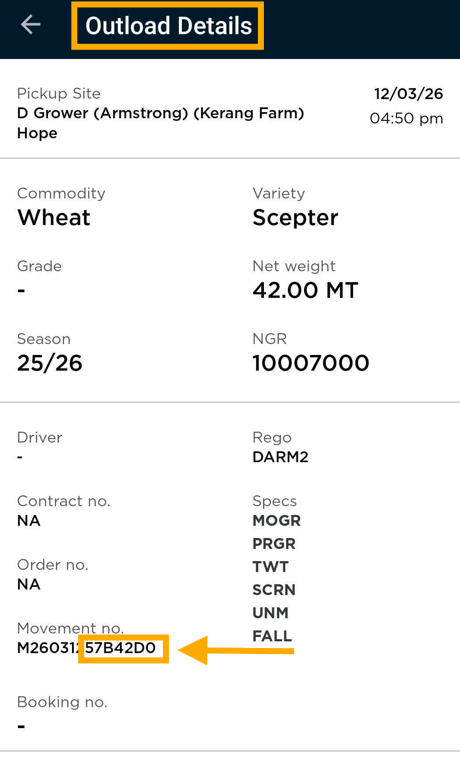
- This will enable AgriChain to match the outload to the inload at Bunge.
Option 2: If NOT outloading from the field or on-farm storage.
- Drivers are to load their trucks physically and drive to their Bunge site for delivery.
- Once the delivery is complete, AgriChain will automatically match the data from Bunge and create delivered movements.
- These delivered movements will then be visible on your AgriChain account.
FAQ
How can I subscribe to this BHC automation service at one of the available sites?
This service is only available to paid subscribers.
- If you are a paid subscriber, please submit a support ticket or get in touch with your Customer Success Manager to discuss.
- If you are looking to subscribe, please submit a support ticket and one of our Sales Team will be in touch to discuss.
How can I get my loads (movements) reviewed or highlight missing ones?
If loads (movements) need to be reviewed or are unaccounted for, please input the details in the shared Working Document Spreadsheet previously provided during your setup process. After inputting the details, should you require further assistance, please submit a support ticket.
AgriChain will also enter any loads (movements) into the shared Working Document Spreadsheet should we require your clarification.
Was this article helpful?
That’s Great!
Thank you for your feedback
Sorry! We couldn't be helpful
Thank you for your feedback
Feedback sent
We appreciate your effort and will try to fix the article