Introduction
AgriChain has a direct integration with the NGR system, which allows for verification of an NGR and its associated bank account details amongst others.
The National Grower Register (NGR) is an online business register for growers throughout Australia, and it is managed by the NGR directly. On the AgriChain platform, NGR Numbers are used as unique identifiers for stock ownership or to record bank payment details for invoicing.
Whilst NGR Numbers are most applicable to Growers, these can also be used by Non-grower entities to manage stock ownership or record payment details for invoicing. The AgriChain platform also has an integration with the NGR for Data Subscribers. Each Company's Profile will have a page to add or edit NGR Numbers, and the ability to add or edit NGR Numbers will depend on your entity type (e.g. Bulk Handler) and the registration status of said company.
Adding or Editing NGR Numbers for my Own Company
- Log in to AgriChain using your credentials.
- Click on your Profile Initials in the top right-hand corner and select the 'NGRs' option.
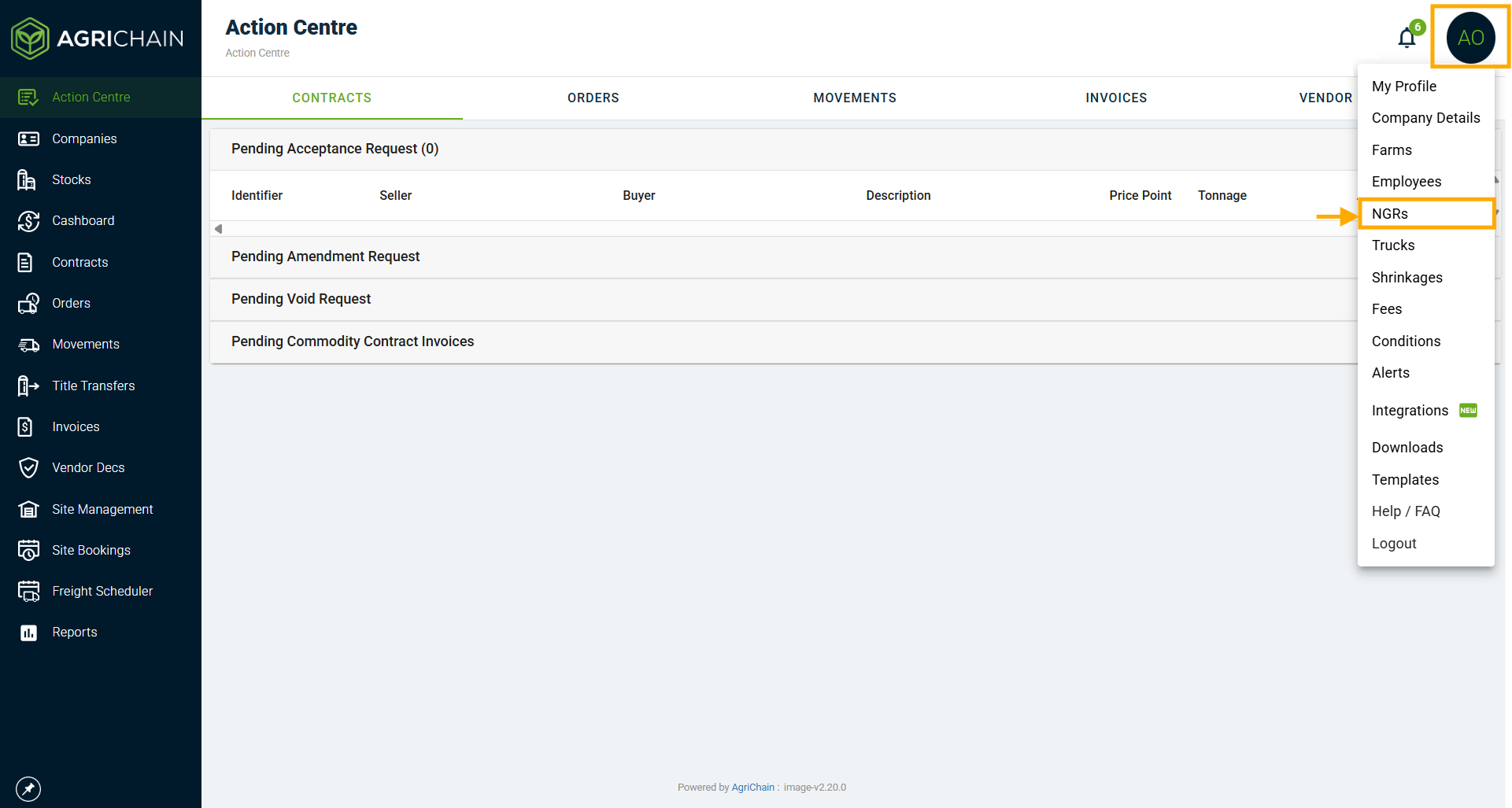
- On the NGRs page:
- Click on the '+NGR' green button to add a New NGR, and a window with the header title 'Add NGR' will appear on the right-hand side of the page.
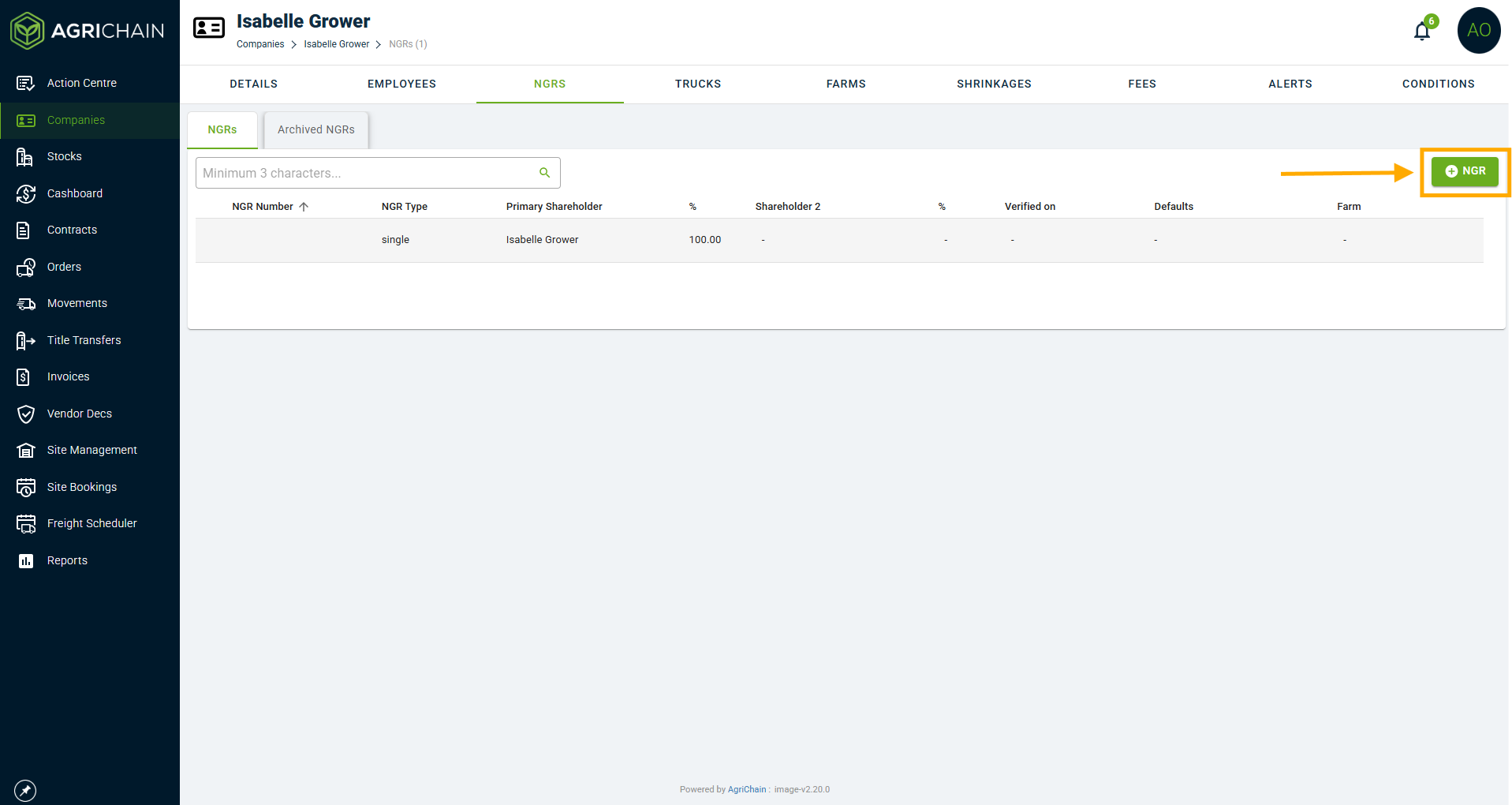
- Click on an existing NGR's line item to edit the NGR, and a window with header title 'Edit NGR' will appear on the right hand side of the page. Click 'Save' when done.
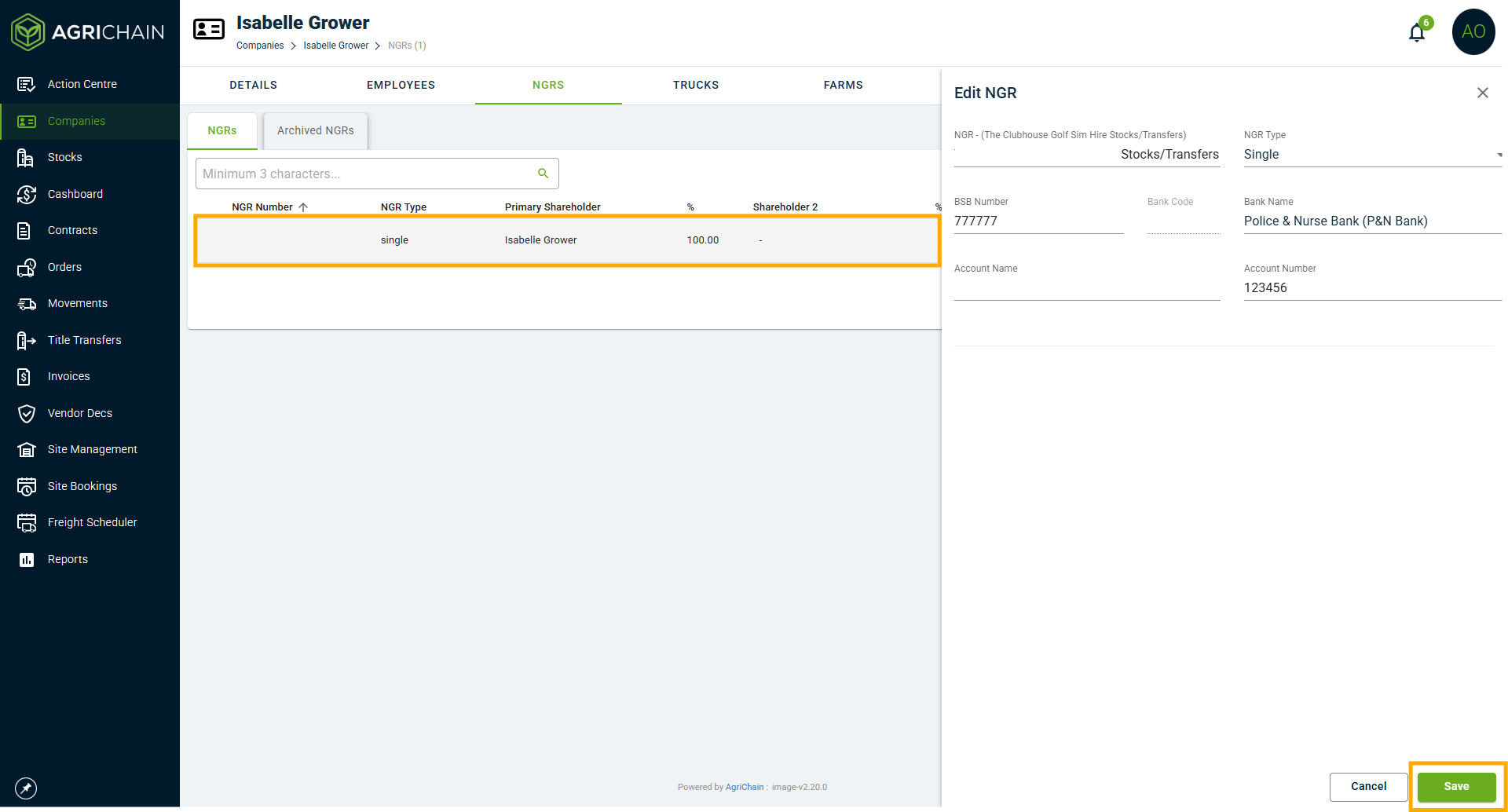
- Click on the '+NGR' green button to add a New NGR, and a window with the header title 'Add NGR' will appear on the right-hand side of the page.
- For each NGR, you will need to define whether it is a 'Single' (relating to one entity and one bank account) or a 'Shared' (multiple entities, shareholders and bank accounts) NGR.
- For a Single NGR Number, input or select the following:
- NGR number
- BSB Number
- Bank Name
- Account Name
- Account Number
- For a Shared NGR Number, input or select the following. :
- Shared NGR Number
- Primary Shareholder %: The Percentage controlled by the primary shareholder.
- Is Primary Shareholder: Tick this check box if said shareholder is the primary shareholder.
- Select Company: Select the company that is associated with the primary shareholder. To note, the company's ABN will need to be added to your Companies Directory first, before it appears in the drop down selection.
- Check out this article: Adding companies to the directory (click here)
- BSB Number of Primary Shareholder
- Bank Name of Primary Shareholder
- Account Name of Primary Shareholder
- Account Number of Primary Shareholder
- Shareholder 2%: The Percentage controlled by the secondary shareholder.
- Input or select the details again for the secondary shareholder.
- Add Shareholder: If there are more than 2 shareholders, click on this button to add an additional shareholder.
- ATTACH SHARE AUTHORITY: Click on this button to upload a copy of the Shared NGR Authority Documentation.
- Finally, click on the "Save" button to complete adding or editing the NGR.
To add or edit the NGR Number of a Company in your Companies Directory
1. Go to your "Companies" Directory section and search for the said Company you are after.
2. Click on the Company's name (line item), OR Click on the 3-dot Action menu and select the "NGRs" section.
3. On said Company's page, select or ensure you are on the "NGRS" tab.
4. From there, repeat Steps 2-6 in the previous section above.
Note: You will NOT be able to add or edit the NGR or Bank Payment Details of companies Registered on the AgriChain platform. To do this, you will need to contact the Company Admin of said Registered company.

However, should you have an NGR Data Subscriber integration with AgriChain, the Bank Payment Details associated with the existing/already added NGR can be fetched directly from the myNGR portal.
How Do I Verify a Grower's NGR?
There is a way to check if a Grower's NGR or multiple NGRs are verified through the integration. Please follow these steps to check if a Company's NGRs are verified:
- Search the Company in Directory and click the Company to open details.
- Select "NGRs" in top task bar.
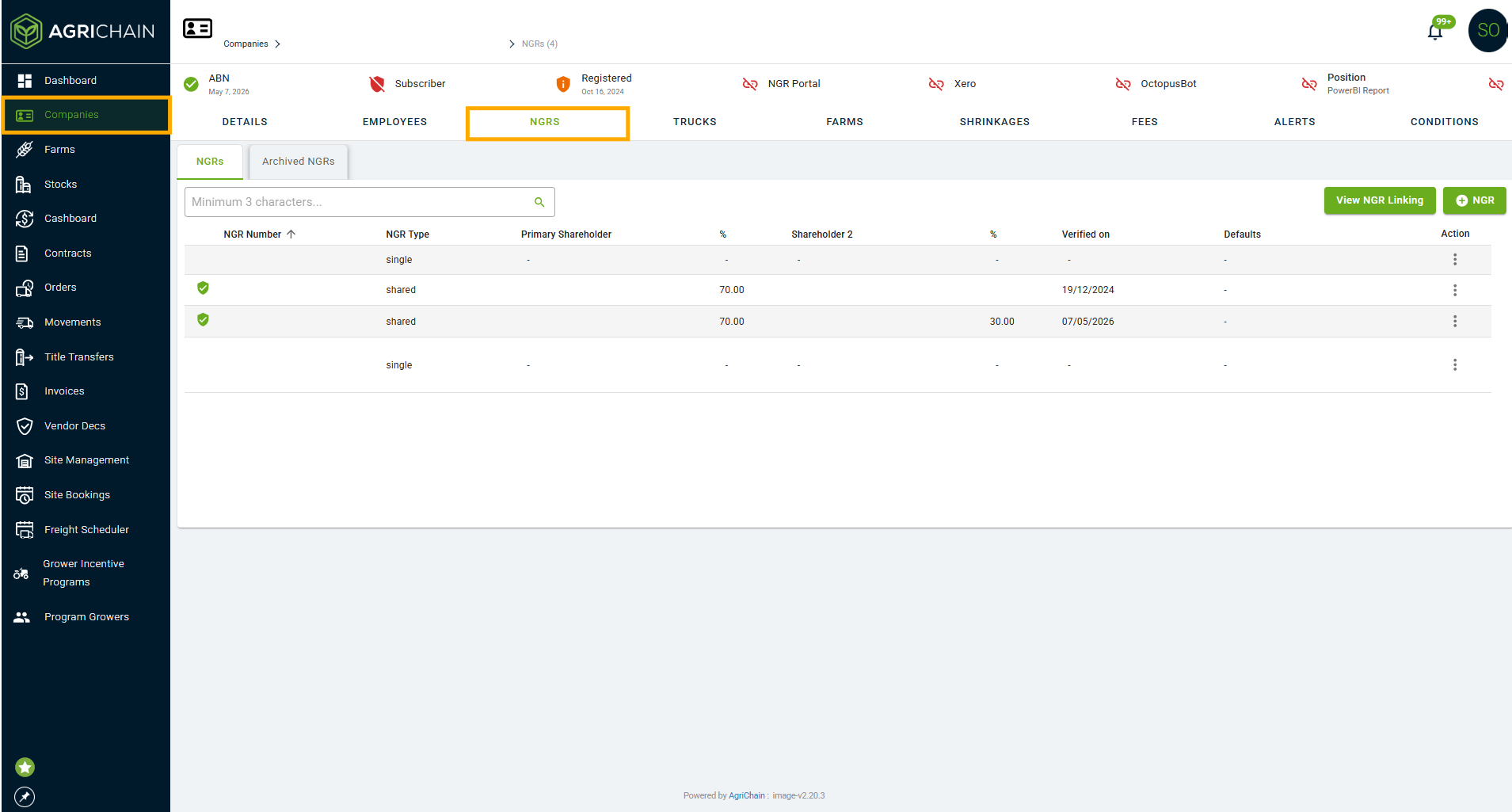
- Look for Green Verified Badge next to NGR/s, also check "Last Verified" date.
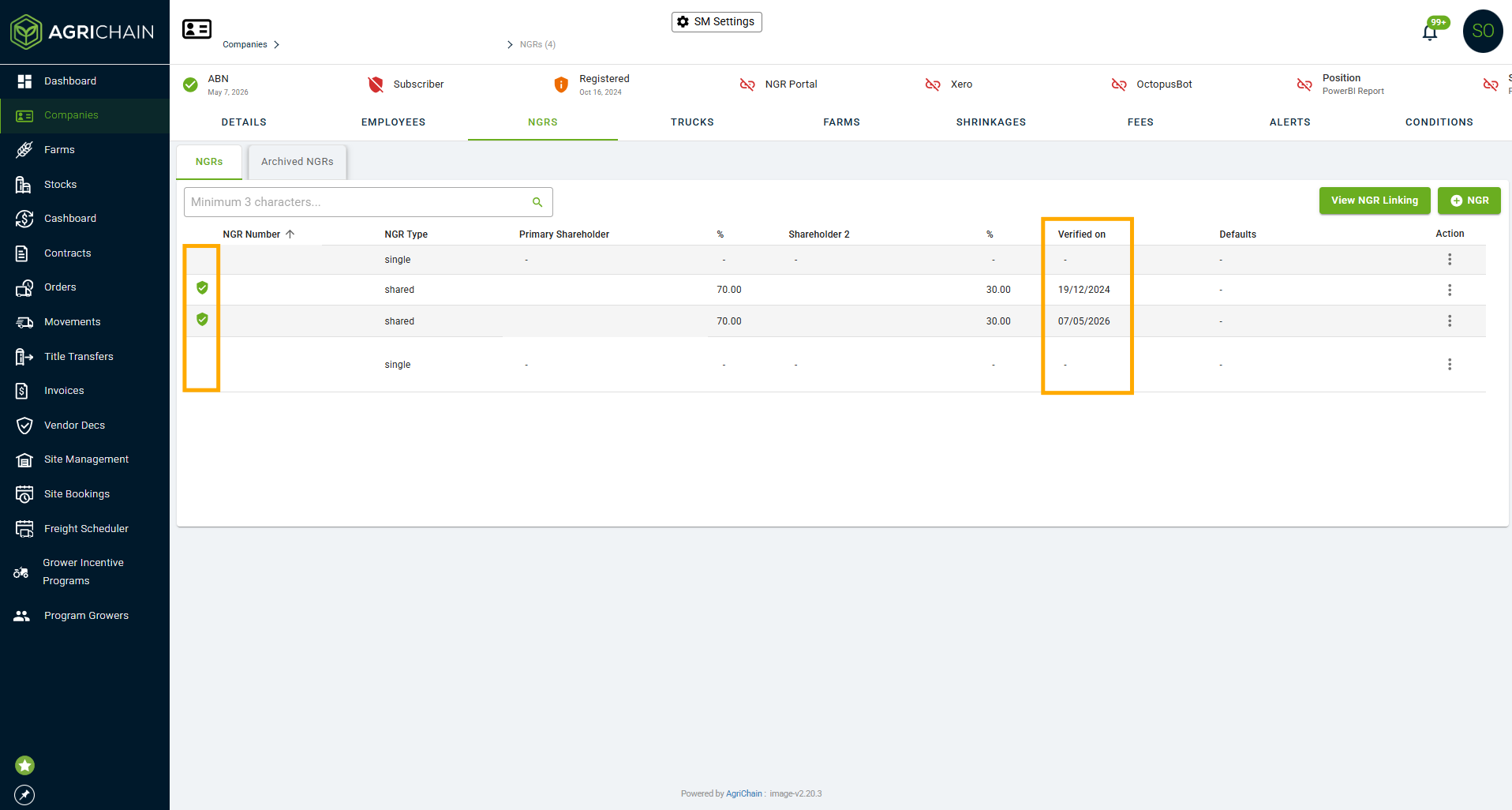
- If they have the Green Verified Badge, proceed with using grower's NGR as required. No badge means it has not been verified.
What do I do if a grower's NGR is not verified?
If the grower's NGR is not verified and you are a Data Subscriber with the NGR, and have linked the NGR portal to AgriChain, you can verify their NGR through your NGR portal. This can only be done if they don't actively use AgriChain themselves. Simply click on the NGR you want to verify under their Company Details, and click "Fetch NGR Details". 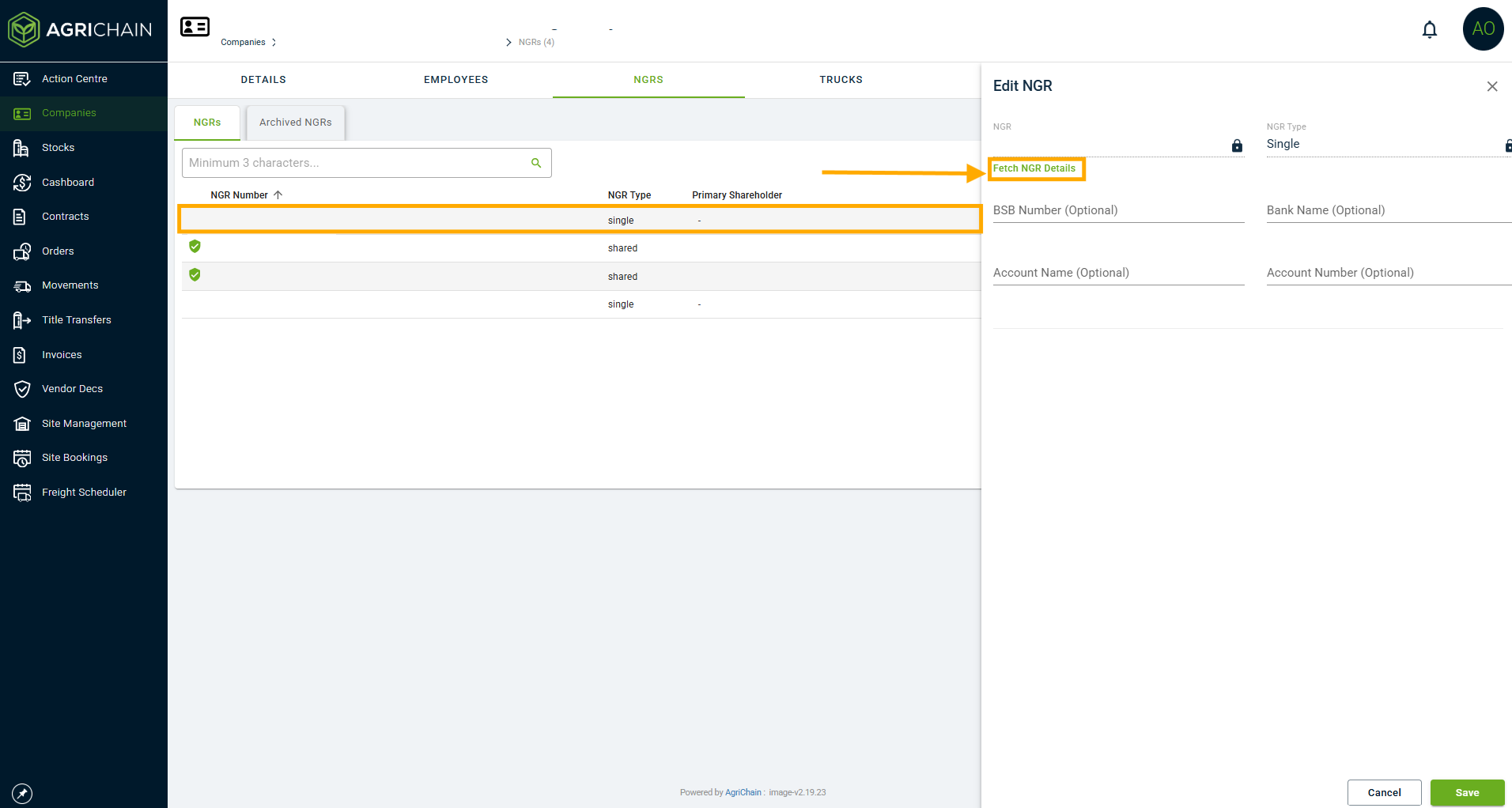
If you are a Data Subscriber with the NGR but have not linked the NGR portal to AgriChain, refer to this article: Link Your NGR Portal to AgriChain.
FAQs
Why am I not able to add/edit the NGR or Bank Payment Details of a Company listed in my Companies Directory?
You will not be able to add or edit the NGR or Bank Payment Details of companies registered on the AgriChain platform. To do this, you will need to contact the Company Admin of said registered company to edit or add their own NGR and associated Bank Payment Details.
As a Data Subscriber, can the AgriChain platform integrate with the National Grower Register (NGR) Portal?
Yes, the AgriChain platform has the ability to integrate Data Subscriber accounts on the National Grower Register (NGR) Portal. To do so, AgriChain will require the API Key from your Data Subscriber NGR Portal account.
Please get in touch with us by submitting a ticket to set it up.
I am a Trader/Bulk Handler Company (BHC) and have been set up inaccurately as a Grower user type on the NGR Portal. How can I get set up as a Data Subscriber user type on the NGR Portal?
In the event that you have been set up as a Grower user type on the NGR Portal but require to be set up as Data Subscriber user type, please contact the NGR directly to convert your account, using the details below:
- NGR Admin Email: admin@ngr.com.au
- NGR Phone Line: 1800 556 630
Was this article helpful?
That’s Great!
Thank you for your feedback
Sorry! We couldn't be helpful
Thank you for your feedback
Feedback sent
We appreciate your effort and will try to fix the article