Steps to Download the Freight Movement CSV
To download the Freight Movement CSV, navigate to the Movements page and click the cloud icon on the right-hand side.
To download the Freight Movement CSV, navigate to the Movements page and click the cloud icon on the right-hand side.
- To download all movements: Select Complete List.
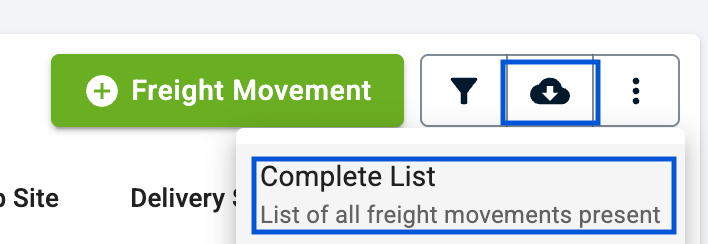
- To download specific movements: Apply the required filters and then select Filtered List.
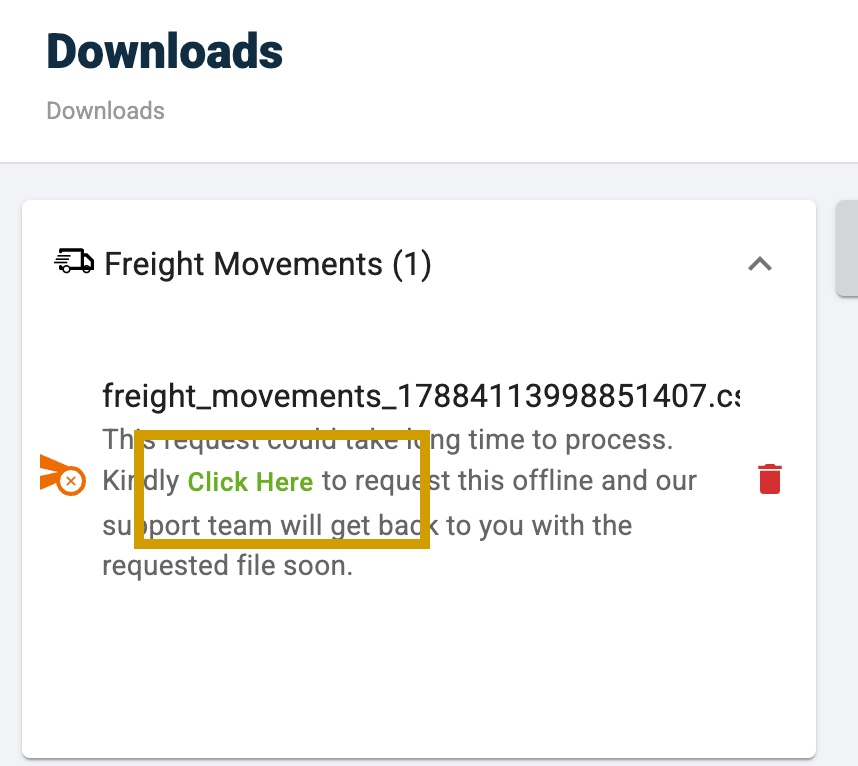
If you are downloading the complete list, the system will not generate the file immediately. In this case, you will need to request an offline download.
To request an offline download:
- Navigate to the Downloads section.
- Click Request Offline.
- Our team will receive the request and retrieve the file from the backend.
- We will then provide the requested CSV file to you.
Was this article helpful?
That’s Great!
Thank you for your feedback
Sorry! We couldn't be helpful
Thank you for your feedback
Feedback sent
We appreciate your effort and will try to fix the article